Graphic Design
Website Graphic Design Ideas for Fireworks
Using Fireworks you can create many unique graphics for both print and web design. The latest versions of Fireworks, Adobe Fireworks CS4/CS5/CS6 are va-va-voom! Read about some of these cool features introduced since CS4. After reading the ideas mentioned on this page please check out our new Fireworks Tutorials on website graphic design. Some of these new tutorials are listed below:
 Paste Inside
  Extract Image
  Blend Mode
  Photo Montage
 Masking
 Transparent Bg
  Glossy Buttons
 3D Ball Graphic
 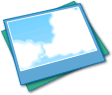 Cloud Effect
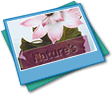 Transparent Text
 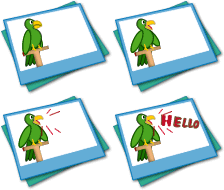 Animated GIF Graphic
 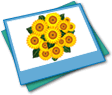 Sunflower Artwork
  Rainbow Effect
  Snail Graphic w/ Spiral
  Twist & Fade Technique
Prerequisite Knowledge
This tutorial teaches you graphic design ideas using Fireworks and thus assumes you are familiar with some design software, even if you are new to Adobe Fireworks. However be assured that our detailed instructions can be followed by even a total novice.
You Are Here ::: Home >> Free Tutorials >> Fireworks Tutorials >> Graphic Design Ideas
Curves
One neat graphic design idea is to use curves. Look at the example below. You will see how we can step by step create a uniform curve.
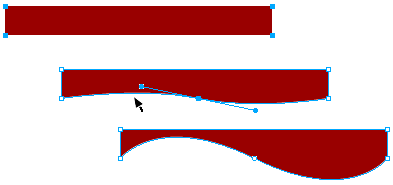
- Step 1: Create a rectangle and select one of its points using the sub-selection tool (white arrow) [Fireworks might tell you that the object is going to be ungrouped, click okay].
- Step 2: Taking the pen tool place a point on the bottom line of the rectangle and drag (click+drag). The curve handles of the point will appear. Release the click.
- Step 3: To adjust the curve, just click the point just created and adjust the curve by clicking and dragging either of the curve handles.
Check out our new website design with Dreamweaver and Fireworks tutorial series that also uses curves in the sample design. Also take a look at these ready made professional web site templates that use curves: Template 7 - Beauty, Template 9 - Business, Template 20 - Hi-Tech.
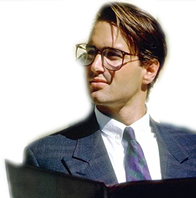
Image Feathering
While using pictures in designing we often don't require certain parts of a picture to be seen, or else, just need a particular part of a picture. For this we can use the various Image Extraction techniques, one of which is to use the Feather effect in Fireworks.
Basically feather removes the otherwise jagged finish to an edited image by giving it a fading in pixel radius. This cool effect makes your pictures stand out and look really professional. Check out our latest tutorial on how to extract images in Fireworks in 3 different ways.
Drop Shadow
 |
|

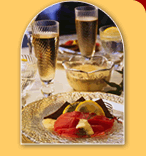





Drop-Shadow is a Graphic Effect found in the Effects Panel of the Properties Window. To give a drop shadow to any graphic element:
- Select the graphic and click the (+) button under Effects.
- In the list of options go to Shadow and Glow > Drop Shadow and the shadow appears.
- In the shadow properties the default value for distance is 7 px and softness is 4. We usually give distance as 2 px and softness as 5 for a soft shadow effect (example 1) and distance as 3 px and softness as 4 for a crisp shadow effect (example 2).
Paste Inside
You can paste any graphic (image or vector) inside a vector shape, so that it appears to be inside it. All you need to do is:
- Place the graphic over the vector shape.
- Selecting only the graphic press Ctrl+x (cut it).
- Now select the vector shape and press Ctrl+Shift+v (paste inside).
- We recommend that the vector shape be given a stroke (outline) and a shadow using the drop-shadow effect so that the overall look is stunning. Read the Paste Inside Tutorial.
Advanced Vector Shapes
Fireworks have a stunning range of advanced vector shapes. Take a look at some of the examples we have created below using the pie, rounded rectangle, advanced polygon, spiral and advanced star auto vector shapes.
|





We love the fact that Fireworks auto shapes have special diamond handles (the yellow points) that help change their properties proportionally.
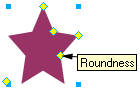 Take a look at the Star Auto Shape vector shown on your left. Create a similar one in Fireworks and try dragging the yellow property handles.
Tip: Using Fireworks Auto Shape vectors you can create advanced shapes like the Sunflower, Snail, Rainbow, 3D Ring, etc. Try experimenting with these tools and have fun!
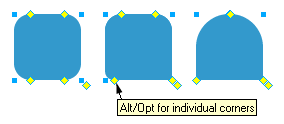 Dome shaped vector: You can create a dome like vector shape using the rounded rectangle auto shape tool
  . See how we have done it step-by-step:
1. Draw a rounded rectangle.
2. Pull the top two handles towards each other till the center.
3. Pull the bottom two handles away from each other till the sides.
Tip: Use Alt+Drag for changing the properties of individual corners.
Software Required
Adobe Fireworks: Since this tutorial covers a core feature of Adobe Fireworks, any version of it will do.Compatible Versions of Fireworks for this Tutorial
 Fireworks 4-8 | Fireworks CS3 | Fireworks CS4/CS5/CS6
Note: The features and instructions discussed in this tutorial are same across all Fireworks versions listed above; Screenshot images may differ. Recommended Version: Fireworks CS6