Flash MovieClip Symbols
How to create a movieclip symbol in Flash
Movieclip symbols are reusable pieces of flash animation - consisting usually of one or more graphic and button symbols - thus they are flash movies within your flash movie. They have their own non-restricted Timeline (any number of layers and frames - just like the main timeline) that plays independent of the main movie's timeline.
You Are Here ::: Home >> Free Tutorials >> Flash Tutorials >> Flash MovieClip Symbols
The best thing about using movieclips is that you can control them with ease - you can change their dimensions, position, color, alpha, and other properties and can even duplicate and delete them. Thus any object that needs to be controlled using flash actionscript (no matter how simple or complex it might be) needs to be a movieclip with an instance name that is called in the actionscript code.
Please carry out the following steps in Flash to create movieclip symbols.
- First create/import the object(s) to be converted into a movieclip. Import bitmaps onto the stage using Ctrl+R.
- Select the object(s) and then press F8 (or Modify >> Convert to Symbol).
- Select the Movieclip Behavior and name the symbol, say 'mc_fade').
- Double-click the instance of 'mc_fade' on the stage to switch to its symbol-editing mode. Now create an animation sequence (you can use simple Tweened Animation or Frame-by-Frame Animation)
- The above figure shows the Timeline of the Movieclip symbol. Click Scene 1 to exit from the symbol editing mode.
- Save your work and test the Movie (Ctrl + Enter). That's it your movieclip is ready! Its that simple.
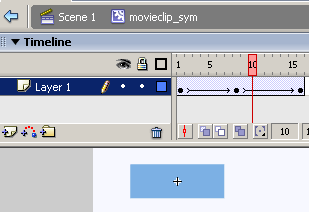
Fig: Symbol-editing Mode of completed flash movieclip 'mc_fade'
Flash Symbols
- Overview of Flash Symbols
- Creating Graphic Symbols
- Creating Button Symbols
- Creating Movie-clip Symbols
Software Required
Compatible Versions of Flash for this Tutorial


Flash CS5 Professional | Flash CS4 Professional
Note: For uses of lower versions of Flash some visual interface images would differ.
Recommended Version: Adobe Flash CS5 Professional