Advanced Flash Buttons
Create Cool Buttons in Flash - Animated, Sound and Actionscript Buttons
In this tutorial you'll learn how to convert a simple flash button into cool button effects using movieclips, sound and actionscript. This article assumes that the reader has knowledge in creating Movieclips and simple Buttons in Flash.
You Are Here ::: Home >> Free Tutorials >> Flash Tutorials >> Advanced Flash Buttons
Creating Advanced Buttons in Flash
We are going to cover how to create advanced flash buttons in three different methods. These cool yet basic methods are sure to help you visualize and create many neat Flash movies!
A. Flash MovieClip Button
Creating an Animated Button by using moviclips in Flash Buttons:
- You can place Movieclip instances inside the Timeline of a Button symbol to create Animated advanced buttons.
- Create a simple Button and enter into its symbol-editing mode. The second frame labeled Over represents the button's appearance when the mouse pointer is over it.
- Drag an instance of Movieclip 'movieclip_sym' from the Library (Ctrl + L) into this frame. Make sure the text (if present) is always above the Movieclip used. This enables you to play the Movieclip every time the mouse points over it (rollover state).
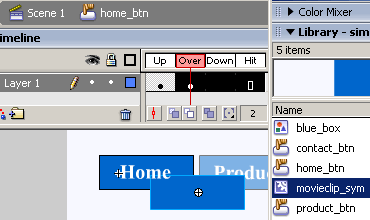
Fig: Showing Movieclip inside a Button
Save your work and test the Movie (Ctrl + Enter). That's it your advanced button is ready! Its that simple.
B. Sound in Flash Button
C. Flash Actionscript Button
Software Required
Compatible Versions of Flash for this Tutorial


Flash CS5 Professional | Flash CS4 Professional
Note: For uses of lower versions of Flash some visual interface images would differ.
Recommended Version: Adobe Flash CS5 Professional